Architecture
Overview
llm-chat-drawio converts a .drawio/.xml diagram file into an SVG or PNG
image. All work happens in the Node process: there is no subprocess, no
headless browser, and no display server.
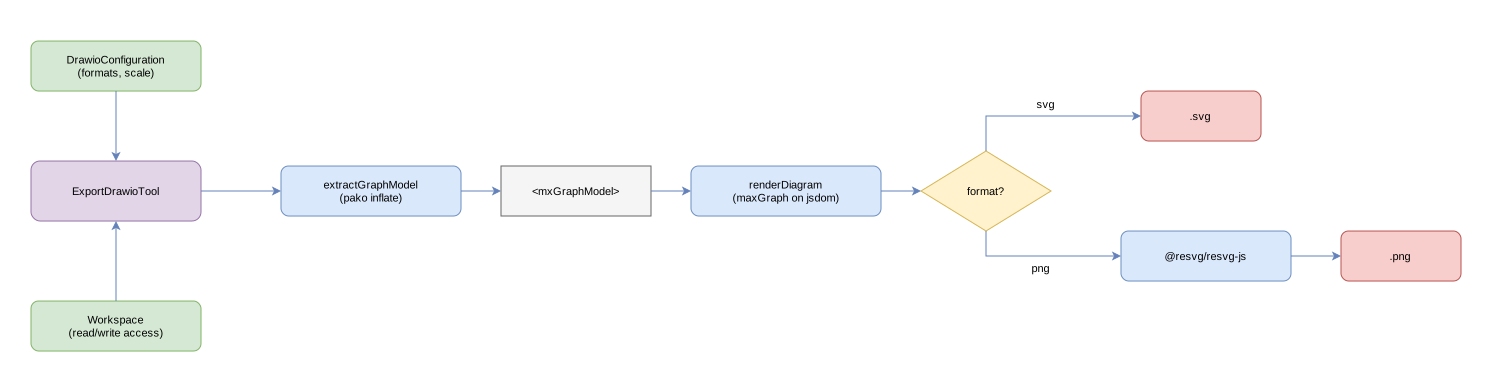
Pipeline
input .drawio ─► parse (decompress + select page) ─► <mxGraphModel> XML
             ─► maxGraph on jsdom ─► SVG string
             ─► format=svg: write SVG
             ─► format=png: @resvg/resvg-js ─► PNG ─► write
- Parse (
src/lib/parse.ts): finds the<diagram>pages of the<mxfile>. Pages saved by the draw.io editor are compressed (base64 of raw deflate); they are inflated withpako. Uncompressed pages are used as-is. A page is selected by zero-based index or by name. - Render (
src/lib/render.ts): installs ajsdomDOM on the Node globals, then imports@maxgraph/core(this order matters: maxGraph needs browser globals at import time). The<mxGraphModel>is imported withGraphDataModel+ModelXmlSerializer, drawn by aGraph, and serialised to an SVG usinggraph.getGraphBounds()for the viewBox. PNG output rasterises that SVG with@resvg/resvg-js. - Write (
src/tools/export-drawio.ts): resolves the input and output paths through theWorkspace, enforces the read/write access lists and the format allowlist, and writes the image.
Access control
Input and output paths are resolved with Workspace.normalize() and checked
with Workspace.canRead() and Workspace.canWrite(), so a tool call can never
read or write outside the configured access lists. The output parent directory
is created on demand.
Fidelity and limitations
- Standard shapes only. maxGraph renders its built-in shapes (rectangle, ellipse, rhombus, swimlane, …). draw.io stencil libraries (AWS, Azure, GCP, Kubernetes icons) are not loaded, so those cells fall back to plain shapes.
- Labels are SVG text. maxGraph renders labels as
<text>, not HTML<foreignObject>, so rasterisation works. HTML markup (<b>,<br>) inside a label is not interpreted. - Text metrics come from jsdom, which has no real font measurement; very tight labels may overflow.