Building messages
ChatInterface serves three purposes:
- Prepare: build the message history the agent will see (system prompt, user messages, seeded assistant/tool messages)
- Record: after
service.send(), read back what the agent produced viachat.messages() - React: observe the stream in real time via hooks
System prompt
The system prompt is built from a tree of components via chat.system(), which
returns the root PromptContainer. To bypass the tree entirely and send a
single flat string, set ChatServiceConfiguration.systemPrompt; chat.getSystem()
then returns that string while chat.system() still exposes the tree. See
Flat system prompt.
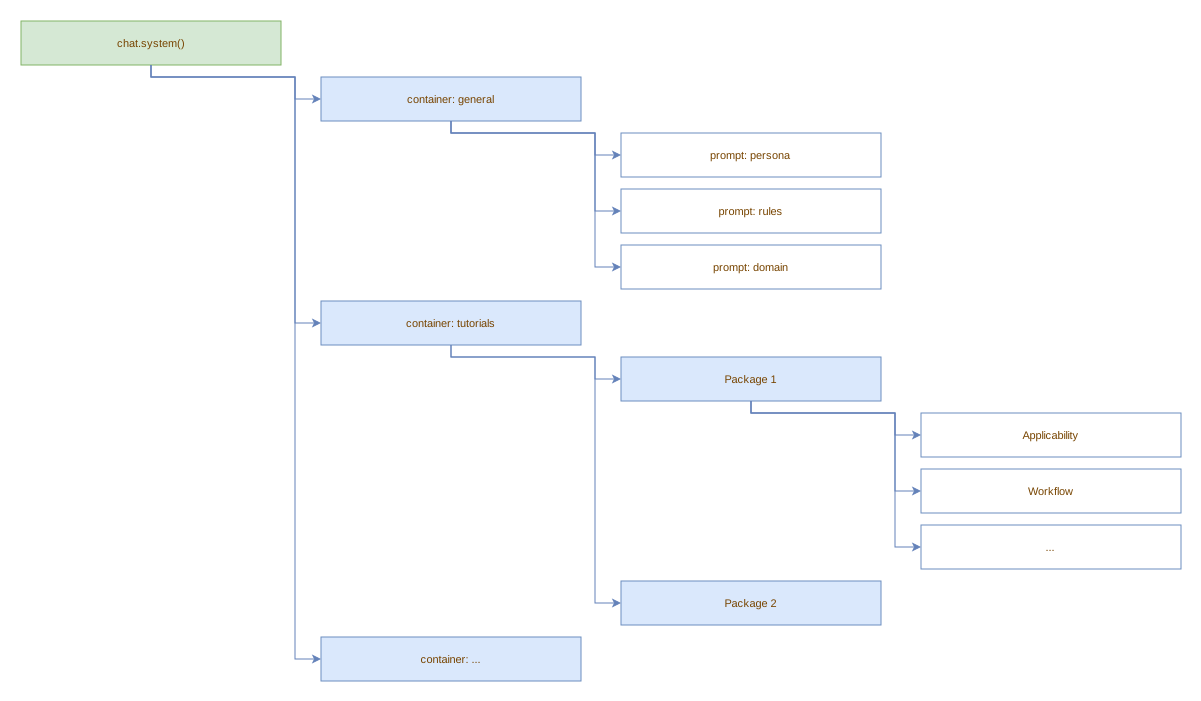
Two standard child containers are available for organisation:
chat.system().child('general'): for persona, rules, domain, behavior, and other general system prompt componentschat.system().child('tutorials'): populated automatically byToolSuitewhen tool packages with tutorial content are registered
General prompt files can be loaded automatically from a directory via
ChatServiceConfiguration.systemPromptDir (env: LLM_CHAT_SYSTEM_PROMPT_DIR).
All .md and .txt files in the directory are loaded as components under
general, with the filename (without extension) as the prompt ID.
Files with any other extension are ignored. The directory is read only if it
exists; it is never created and no default files are written.
The system prompt is stored separately from the regular message list:
chat.messages(): returns only user, assistant, tool, and reasoning messages. The system message is not included.chat.getSystem(): returns the effective system message: an override installed by the service (a flatsystemPrompt) when configured, otherwise the composed prompt tree.nullwhen neither yields content.
When service.send() sends messages to the provider, the system prompt is always the first element.
Every message is automatically timestamped with a createdAt: Date set at creation time and tagged with an origin field (ChatMessageOrigin) indicating whether it came from the user, the model, a tool, a hook, or the system prompt.
Tutorial container
The tutorials child container is populated automatically by ToolSuite.
When a ToolPackage with a non-null tutorial() return value is registered,
the suite creates a sub-container titled Tool Package <ClassName> with an
Applicability child (the comma-separated tool names) and a Tutorial child
(the value returned by tutorial()). The resulting tree is injected under
chat.system().child('tutorials'), so it appears in every conversation
alongside the general prompts. See Tool packages
for the full example.
Adding messages
chat.system().child('general').prompt('persona').setContent("You are a pirate.");
chat.user("Hello!");

// seed assistant responses or fake tool calls
chat.assistant("Let me check...", [{ id: "call_1", type: "function", function: { name: "get_weather", arguments: '{"city":"Berlin"}' } }]);
chat.tool('{"temp":22}', "call_1");
chat.assistant("It's 22°C.");
Direct chat vs message queue
Messages can be added in four ways: user(), assistant(), tool(), and reasoning(), either directly on the chat handle or via the message queue. Choose based on timing and concurrency needs.
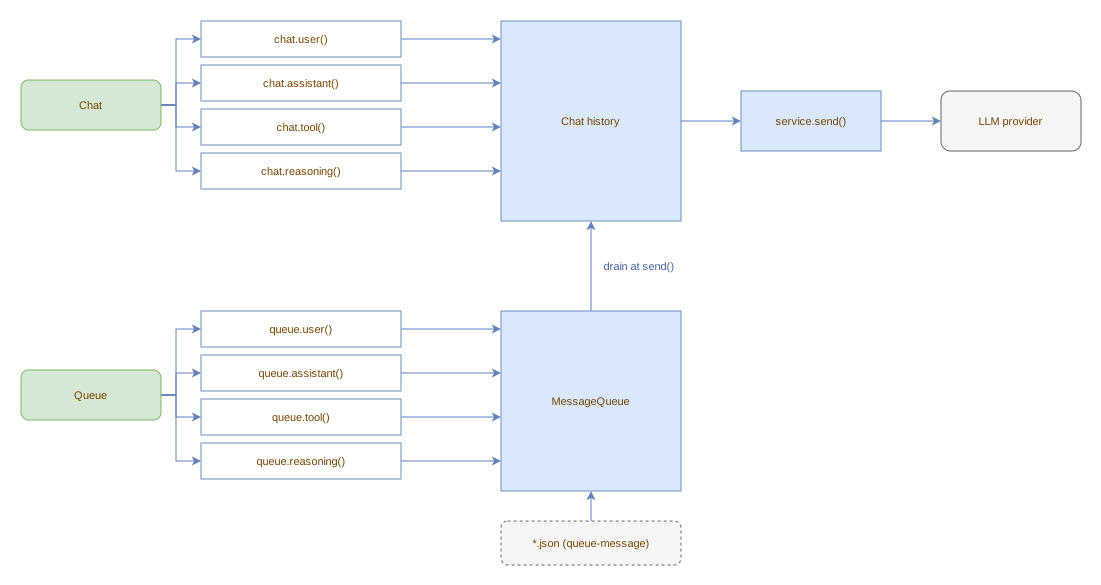
Direct chat (chat.xxx())
Use chat.user(), chat.assistant(), chat.tool() to:
- Build history before sending: prepare the conversation that will be sent to the LLM on the next
service.send(). - Record model output: after
service.send()returns, the service uses direct chat internally to record assistant responses and tool results. - Fire message hooks immediately: appending triggers any registered message hooks in real time.
Messages are appended immediately under the chat's own mutex.
Message queue (service.queue().xxx())
Use service.queue().user(), service.queue().tool() to:
- Enqueue from concurrent contexts: timers, interrupt handlers, or any code that runs while an in-flight
send()is executing. The queue has its own mutex and does not block the send. - Stage messages without triggering hooks: queued messages sit in a buffer. No hooks fire during enqueue.
- Inject from JSON hooks: hook definitions with the
queue-messageaction write to the same queue, tagged withorigin: Hook.
Messages are drained into the chat at the start of the next service.send() call. At that point they fire message hooks like any other added message. See ChatService message queue for details.
Hook-specific variant
Hooks use a separate HookMessageWriter interface (backed by the same MessageQueue) to enqueue messages with an explicit origin parameter. See HookMessageWriter.
Quick reference
| Use this | When to use |
|---|---|
chat.user() / chat.assistant() / chat.tool() |
Immediate appending, hook firing, building history before send() |
service.queue().user() / service.queue().tool() |
Concurrent staging, deferred processing, hook injection |
Clearing
chat.clear() removes all conversation messages, clears historic messages,
clears the system prompt tree (children are removed, title is reset), and
unregisters any message hook listeners. The same PromptContainer root stays
in place; children are cleared rather than replaced:
chat.system().child('general').prompt('persona').setContent("You are a pirate.");
chat.user("Hello!");
chat.clear();
chat.messages(); // []
chat.getSystem(); // null
Pass retainHooks: true to preserve message hooks across the reset:
If tool packages with tutorials were registered, call service.resetTutorials()
after chat.clear() to re-attach and re-populate the tutorials child container
in the fresh system prompt tree. See ChatService.
Clearing messages only
chat.clearMessages() removes conversation and historic messages, keeping the
system prompt and message hook listeners intact:
chat.system().add(new Prompt('Persona', 'You are a pirate.'));
await chat.user("Hello!");
await chat.handoff({ apply: () => [] }); // populates historic messages
chat.clearMessages();
chat.messages();          // []
chat.historicMessages();  // []
chat.getSystem();         // not null (system prompt preserved)
Silent mode
chat.silent(true) suppresses emission of new messages to hook listeners
without affecting the message history. Call chat.silent(false) to re-enable:
chat.silent(true);
await chat.user("This won't trigger hooks"); // hooks do not fire
chat.silent(false);
await chat.user("This will trigger hooks");  // hooks fire normally
Messages are still added to history while silent.
To reset the entire service (chat, stream, tools, and JSON hooks) in one call,
use service.clear(); see ChatService.